
Introduction
Picking a hosting provider involves far more than scanning a pricing table. Behind every great hosting deal sits a piece of software you’ll actually interact with every single day — the hosting control panel. It’s the cockpit of your website, the place where domains are connected, WordPress gets installed, emails are configured, and SSL certificates are activated.
Yet most buyers never think about the control panel until after they’ve purchased a plan — and that’s where regret usually begins.
This complete guide walks you through every major type of hosting control panel available in 2026, what each one truly offers, and which audience it serves best.
What Exactly Is a Hosting Control Panel?
A hosting control panel is a browser-based dashboard that lets you operate your hosting account through clicks instead of server commands. It connects you to the back-end of your server through a clean visual layer.
With any modern web hosting control panel, you can typically:
- Launch and manage websites and subdomains
- Set up professional email accounts
- Install applications like WordPress, Joomla, or Magento
- Configure MySQL or PostgreSQL databases
- Generate free SSL certificates
- Schedule automatic backups
- Track bandwidth, CPU, and storage usage
- Manage DNS records and FTP accounts
- Monitor security and access logs
Why the Hosting Control Panel Deserves Your Attention Before Buying
| Factor | Why It Matters |
|---|---|
| Daily Usability | You’ll open it constantly — clean design saves real time |
| Learning Curve | The wrong panel can stall your launch by days |
| WordPress Tools | Built-in installers and toolkits speed up site building |
| Server Footprint | Lightweight panels free up CPU and RAM for your website |
| OS Support | Some panels run only on Linux, others on both Linux and Windows |
| Licensing Cost | Paid panels can quietly inflate your monthly hosting bill |
| Community Help | Larger communities mean faster answers when issues arise |
1. hPanel — The Modern Beginner’s Favorite
Best for: Absolute beginners, WordPress users, small business owners, Hostinger customers
hPanel is Hostinger’s in-house dashboard, and over the past few years it has become one of the most talked-about hosting control panels for newcomers. Its appeal is simple: it strips away the overwhelming layout of traditional panels and replaces it with a clean, modern, app-like interface that feels closer to a mobile dashboard than a server tool. Because Hostinger is one of the most aggressively priced and widely purchased hosting brands worldwide, hPanel quietly powers millions of websites — making it impossible to ignore in any serious hosting comparison.
Key Features
- Streamlined website dashboard built for non-technical users
- One-click WordPress installer with auto-updates
- Integrated domain, DNS, and email management
- Built-in file manager and database tools
- Free SSL activation in a single click
- AI-powered website and content tools on selected plans
- Smooth website migration assistant
Pros
- Among the easiest panels for first-time website owners
- Modern, distraction-free interface
- Excellent WordPress workflow
- Designed around speed and simplicity
Cons
- Available exclusively through Hostinger
- Cannot be transferred to other hosting providers
- Fewer advanced server-level controls than developer panels
2. Plesk — The Polished All-Rounder
Best for: Beginners who want a clean UI, developers, agencies, Windows server users
Plesk sits in a sweet spot between beginner-friendliness and developer power. Its modern sidebar layout and logical grouping make it less visually crowded than older panels, and many new users find it easier to navigate on their very first login. What truly sets Plesk apart is its dual compatibility — it runs natively on both Linux and Windows servers, making it the default choice for ASP.NET and .NET-based projects. Its WordPress Toolkit is widely regarded as the best WordPress management environment built into any control panel.
Key Features
- WordPress Toolkit with staging, cloning, and security scanning
- Native Linux + Windows server support
- Git, Docker, and Node.js integration
- Imunify security extension
- Clean sidebar navigation
- Multi-server management dashboard
Pros
- Modern, organized interface
- Excellent for WordPress site owners and agencies
- Only major panel offering Windows hosting support
- Strong developer toolset out of the box
Cons
- Licensing cost included in hosting price
- Some premium features locked behind paid extensions
- Smaller tutorial library than cPanel
3. cPanel — The Industry Veteran with the Biggest Community
Best for: Shared hosting users, bloggers, small businesses, users who learn through tutorials
cPanel is the most recognized hosting control panel on the planet. For over two decades it has been the default offering on shared hosting plans across countless hosting providers — which means its real superpower is its enormous community of tutorials, guides, videos, and forum threads. Its interface is feature-dense, with many icons grouped on one screen. That can feel busy at first, but the trade-off is that virtually every question you’ll ever have has already been answered somewhere online.
Key Features
- File Manager with drag-and-drop uploads
- Softaculous auto-installer for 400+ apps
- Email account, forwarder, and filter management
- DNS Zone Editor and SSL/TLS manager
- Backup Wizard with restore options
- MySQL Database Wizard and phpMyAdmin
- Traffic and visitor statistics
Pros
- Largest user base and community library in the industry
- Bundled with the majority of shared hosting plans
- Massive third-party tool compatibility
- Reliable, time-tested feature set
Cons
- Interface feels denser than modern panels like hPanel or Plesk
- Linux-only — no Windows support
- Licensing cost can raise hosting prices
4. DirectAdmin — The Lightweight Speed Specialist
Best for: Budget VPS users, resellers, performance-focused websites
DirectAdmin is the panel that hosting providers reach for when they want to deliver speed without inflating prices. Compared to cPanel and Plesk, it uses dramatically fewer server resources — leaving more CPU and RAM available for the websites it hosts. That efficiency is exactly why DirectAdmin powers many of the most competitively priced VPS and reseller hosting plans on the market.
Key Features
- Granular admin, reseller, and user permission tiers
- Built-in reseller management tools
- Scheduled backups with remote FTP offload
- Brute-force intrusion monitor
- Full email account suite
- Integrated help desk ticket system
Pros
- Extremely lightweight server footprint
- Lower licensing cost = cheaper hosting plans
- Snappy interface even on slow connections
- Built-in reseller tooling
Cons
- Smaller ecosystem than cPanel or Plesk
- Less polished UI compared to modern alternatives
- Fewer one-click application installers
5. CyberPanel — The WordPress Speed King
Best for: Speed-obsessed WordPress sites, LiteSpeed users, VPS hosting
CyberPanel is built around the OpenLiteSpeed web server — one of the fastest open-source web servers available. Its native integration with LiteSpeed Cache makes it a top pick for WordPress sites where page load speed is a priority. It’s modern, growing rapidly, and available in a generous free version that works beautifully on self-managed VPS environments.
Key Features
- Native LSCache + OpenLiteSpeed integration
- One-click optimized WordPress installation
- ModSecurity WAF for built-in protection
- Docker manager
- Free Let’s Encrypt wildcard SSL
- Built-in Rainloop webmail client
Pros
- Outstanding raw performance
- Free tier available for self-managed VPS
- Excellent WordPress speed optimization
- Built-in security tools
Cons
- Smaller support community than cPanel
- Documentation still maturing
- Less compatible with legacy applications
6. CloudPanel — The Cloud Hosting Specialist
Best for: Cloud server users (AWS, Google Cloud, Vultr, Hetzner, DigitalOcean), PHP developers
CloudPanel is one of the freshest names in the hosting control panel space — and arguably the most underrated. Built specifically for cloud server environments, it’s free, lightweight, and laser-focused on PHP applications and WordPress. It strips away unnecessary clutter and gives developers a clean, fast, performance-tuned dashboard built around Nginx.
Key Features
- Modern, minimalist interface
- Full PHP version management
- WordPress-ready optimization
- Native Nginx support
- Free Let’s Encrypt SSL
- Cloud-server tuned architecture
Pros
- Completely free
- Designed specifically for cloud hosting environments
- Lightning-fast and lightweight
- Excellent for PHP-based projects
Cons
- No built-in mail server
- Requires basic cloud server knowledge
- Smaller ecosystem than veteran panels
7. aaPanel — The Free Power Panel for VPS Users
Best for: Budget-conscious VPS users, developers, multi-environment server setups
aaPanel has surged in popularity thanks to one simple equation: free + flexible + practical. It supports multiple web server stacks — Apache, Nginx, and OpenLiteSpeed — which makes it unusually adaptable for different types of projects. It also features its own app store, giving VPS users a one-click way to install everything from caching tools to development frameworks.
Key Features
- Apache, Nginx, and OpenLiteSpeed support
- App store for one-click installs
- Database, FTP, and cron management
- SSL certificate manager
- Built-in file manager and security tools
- Lightweight backup utilities
Pros
- Completely free
- Flexible multi-server-stack support
- Friendly interface for a free panel
- Great for testing and development environments
Cons
- Requires VPS-level knowledge
- Security must be hardened manually
- Rarely bundled with mainstream shared hosting
8. HestiaCP — The Open-Source VPS Favorite
Best for: Developers, small agencies, VPS users who want a free panel with email support
HestiaCP (Hestia Control Panel) is the modern continuation of the once-popular VestaCP. It’s open-source, fast, and includes essential hosting features many free panels skip — most notably, a built-in mail server. For VPS users who want to host websites and email without paying for a commercial panel, HestiaCP hits a rare sweet spot.
Key Features
- Website, DNS, mail, and database management
- Apache + Nginx dual-stack support
- Free Let’s Encrypt SSL
- Firewall integration (iptables + fail2ban)
- Multi-user account management
- Lightweight resource consumption
Pros
- Free and open-source
- Includes a built-in mail server
- Active and growing community
- Excellent value for small VPS deployments
Cons
- Some technical comfort required
- Less polished UI than commercial panels
- Smaller help library than cPanel or Plesk
9. Webmin / Virtualmin — The Sysadmin’s Toolkit
Best for: Linux administrators, advanced developers, dedicated server users
Webmin is a free, open-source server administration suite, while Virtualmin adds a hosting-focused layer on top. Together they create a deeply powerful environment for managing servers, websites, mail, DNS, and databases. This combo isn’t for beginners. It’s for users who want full server control and aren’t afraid of a Linux terminal.
Key Features
- Granular server configuration access
- Full virtual hosting management (Virtualmin)
- Hundreds of optional modules
- Automatic Let’s Encrypt SSL
- LAMP stack management
Pros
- Completely free
- Extremely powerful and flexible
- Deep customization through modules
- Strong fit for dedicated servers
Cons
- Steep learning curve
- No guided setup wizards
- Community-only support
10. ISPConfig — The Multi-Server Panel
Best for: Hosting businesses, multi-server environments, sysadmins
ISPConfig is built for users managing multiple servers from a single dashboard — including web, mail, DNS, and database servers in clusters. It’s open-source, mature, and widely deployed in professional hosting environments.
Key Features
- Multi-server and cluster management
- Reseller account tiers and quota controls
- Wide Linux distribution support
- UFW and Fail2Ban firewall integration
- Compatible with Nginx, Apache, Postfix, Dovecot
Pros
- Free and battle-tested
- Unmatched multi-server capabilities
- Reliable enterprise stability
- Strong reseller management features
Cons
- Steep setup and learning curve
- Dated interface
- Requires solid Linux experience
11. Froxlor — The Minimalist Open-Source Panel
Best for: Lightweight VPS setups, developers who prefer simplicity
Froxlor is a stripped-down, open-source panel focused on essentials. It avoids feature bloat and delivers the basics with a small server footprint — making it ideal for small VPS deployments and developer projects.
Key Features
- Customer and reseller account management
- Apache + Nginx support
- Automated Let’s Encrypt SSL
- Minimal RAM and CPU usage
Pros
- Free and open-source
- Clean, uncluttered design
- Very low resource consumption
Cons
- Limited features compared to commercial panels
- Smaller community and fewer tutorials
12. Hepsia — The Proprietary All-In-One Panel
Best for: Users on hosting providers that bundle Hepsia as their default panel
Hepsia is a proprietary control panel offered by select hosting companies. It combines hosting management, domain management, email, and billing into a unified dashboard — useful for users who want everything under one interface.
Key Features
- Unified hosting + domain + email dashboard
- Built-in website builder tools
- One-click CMS installers
- Integrated backup utilities
Pros
- Streamlined all-in-one experience
- Optimized for the provider’s infrastructure
- Beginner-friendly layout
Cons
- Tied to specific hosting providers
- Not portable to other hosts
- Smaller tutorial library
Side-by-Side Hosting Control Panel Comparison
| Control Panel | Best For | Beginner-Friendly | Pricing | OS Support |
|---|---|---|---|---|
| hPanel | Absolute beginners (Hostinger) | Very High | Included with Hostinger | Linux |
| Plesk | Beginners, agencies, Windows users | Very High | Paid (via host) | Linux + Windows |
| cPanel | Shared hosting, community learners | High | Paid (via host) | Linux |
| DirectAdmin | Budget VPS, resellers | Medium-High | Paid (lower cost) | Linux |
| CyberPanel | WordPress speed, VPS | Medium | Free / Paid | Linux |
| CloudPanel | Cloud servers, PHP devs | Medium | Free | Linux |
| aaPanel | Free VPS users | Medium | Free | Linux |
| HestiaCP | Open-source VPS w/ email | Medium | Free | Linux |
| Webmin/Virtualmin | Sysadmins | Low | Free | Linux |
| ISPConfig | Multi-server hosting | Low | Free | Linux |
| Froxlor | Minimalist VPS | Medium | Free | Linux |
| Hepsia | Provider-specific users | High | Included with host | Proprietary |
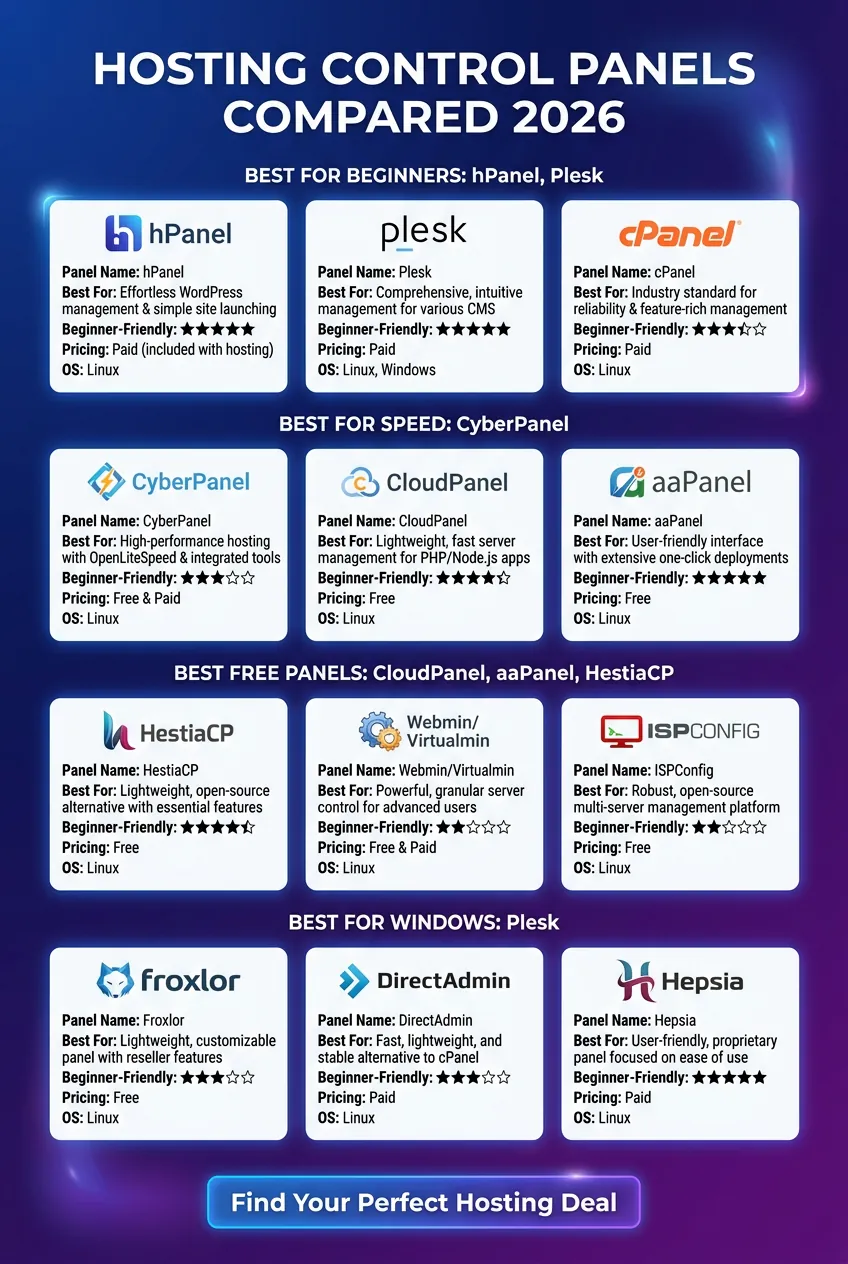
Which Hosting Control Panel Should You Choose?
Complete beginner: hPanel (with Hostinger) or Plesk — clean, modern interfaces
Learn through tutorials: cPanel — unmatched community
Need Windows hosting: Plesk — only major panel with full Windows support
Tight budget on VPS: DirectAdmin, CyberPanel, CloudPanel, aaPanel, or HestiaCP
Priority is WordPress speed: CyberPanel with OpenLiteSpeed + LiteSpeed Cache
Hosting on AWS/GCP/Vultr/Hetzner: CloudPanel — purpose-built for cloud
Developer/sysadmin: Webmin/Virtualmin, ISPConfig, or Froxlor
Frequently Asked Questions
What is the most popular hosting control panel in 2026?
cPanel remains the most widely deployed globally, but hPanel and Plesk are growing fast among beginners.
Is hPanel easier than cPanel?
For complete beginners, hPanel typically feels simpler thanks to its clean, app-like interface. cPanel offers more advanced features but a denser layout.
What’s the best free hosting control panel?
CyberPanel, CloudPanel, aaPanel, and HestiaCP are the top free options in 2026.
Can I switch hosting control panels later?
Usually no — the panel is tied to your host’s infrastructure. Always pick the right one before purchasing.
Which control panel is best for WordPress?
Plesk (WordPress Toolkit), CyberPanel (LiteSpeed speed), and hPanel (beginner WordPress workflow) are the top three.
Does the control panel affect website performance?
Yes — lighter panels like DirectAdmin, CloudPanel, CyberPanel, and HestiaCP leave more resources for your website.
Final Thoughts: The Control Panel Is Part of the Hosting Deal
When evaluating the best hosting providers and deals, don’t let pricing alone drive your decision. The hosting control panel quietly determines how productive, frustrated, secure, or confident you’ll feel managing your website every single day.
The best hosting deal isn’t the cheapest one — it’s the one where price, performance, support, and control panel experience align perfectly with your goals.