1. Introduction — The Real Cost of Getting Hosting Wrong
Launching a website feels electrifying — until the moment something breaks. For the majority of beginners venturing into the world of online publishing, the very first misstep rarely happens on the design table or within the content editor. It happens far earlier: at the moment a hosting plan is selected.
Web hosting is the foundation beneath every pixel of your website. When that foundation is flawed — whether due to a hasty decision, a misunderstood feature, or a clause buried in fine print — the consequences ripple outward into slow load times, unexpected downtime, security vulnerabilities, and a customer service experience that leaves you stranded.
The unsettling reality is that many of these mistakes are entirely avoidable. They stem not from ignorance but from the absence of a structured, experienced perspective at the point of decision. This guide serves as that perspective — a thorough walkthrough of the ten most consequential hosting mistakes beginners consistently make, alongside the knowledge needed to sidestep each one with confidence.
2. Mistake #1 — Choosing the Cheapest Plan Without Evaluating Value
The gravitational pull of a low price point is one of the most powerful forces in consumer decision-making — and hosting providers know this better than anyone. Promotional banners advertising plans for a fraction of the standard market rate are engineered to attract first-time buyers who have not yet developed the vocabulary to distinguish a genuine deal from a calculated compromise.
What beginners frequently fail to recognise is that an introductory price carries an expiration date. The plan that initially appeared affordable will renew at a rate that can be three to five times higher. Beyond renewal pricing, ultra-low-tier plans often come with resource constraints — severely throttled CPU allocations, restrictive memory caps, and shared infrastructure that degrades in performance during peak traffic windows.
What to Do Instead
- Assess the full-term cost across a two or three-year commitment, not just the initial promotional rate.
- Cross-reference the resource allocations — storage type (SSD vs HDD), RAM, CPU threads, and bandwidth caps.
- Prioritise providers that offer transparent renewal pricing in their initial checkout flow.
- Evaluate included extras: free domain, SSL certificate, CDN access, and automated backups.
3. Mistake #2 — Ignoring Uptime Guarantees and SLA Clauses
Uptime — the percentage of time your website remains accessible to visitors — is arguably the single most consequential performance metric a hosting provider can offer. Yet a significant proportion of beginners treat it as a peripheral detail rather than a non-negotiable standard.
An uptime guarantee of 99.9% sounds impressively close to perfection. However, translating that figure into real-world terms reveals a different picture: 99.9% uptime still permits up to 8.7 hours of downtime per year. For an e-commerce store or a business website where every hour of inaccessibility translates directly into lost transactions, that tolerance is far from acceptable. The difference between a 99.9% and a 99.99% guarantee is not cosmetic — it is the difference between 8.7 hours and 52 minutes of annual downtime.
Uptime Guarantee Reality Check
| Uptime % | Annual Downtime | Monthly Downtime |
|---|---|---|
| 99.0% | ~87.6 hours | ~7.3 hours |
| 99.9% | ~8.7 hours | ~43.8 minutes |
| 99.95% | ~4.4 hours | ~21.9 minutes |
| 99.99% | ~52.6 minutes | ~4.4 minutes |
What to Do Instead
- Demand a minimum 99.9% uptime SLA with a verifiable compensation clause for breaches.
- Seek providers that publish transparent, real-time uptime monitoring dashboards.
- Cross-reference user reviews on independent platforms to validate advertised claims.
- Understand the difference between ‘network uptime’ and ‘server uptime’ in provider contracts.
4. Mistake #3 — Skipping SSL Certificate Verification
An SSL (Secure Sockets Layer) certificate is not a decorative addition to a website — it is the cryptographic mechanism that encrypts data exchanged between your server and your visitors’ browsers. In the current digital landscape, its absence is not merely a technical oversight; it is a public declaration of insecurity.
Browsers such as Chrome and Firefox actively label websites without SSL as ‘Not Secure,’ a designation that erodes visitor trust before a single word of content is read. Furthermore, Google’s ranking algorithms treat HTTPS as a confirmed ranking signal, meaning that an unencrypted website operates at a measurable disadvantage in organic search results from the moment it launches.
Many beginners either assume SSL is automatically included, or they defer its installation until after launch — by which point their first wave of visitors has already been greeted with a browser warning. Both approaches carry significant consequences.
What to Do Instead
- Confirm that a free SSL certificate (Let’s Encrypt or equivalent) is included before finalising your plan.
- Verify that your hosting control panel supports one-click SSL activation without requiring manual configuration.
- Ensure SSL auto-renewal is enabled so your certificate does not expire silently.
- After installation, test your SSL using tools such as SSL Labs to confirm full implementation.
5. Mistake #4 — Overlooking the Backup and Restore Policy
Every website, regardless of its maturity, is susceptible to data loss. A plugin conflict, a botched update, a malicious intrusion, or a simple human error can strip away weeks or months of carefully constructed content in an instant. The degree to which you recover from such an event — and how quickly — is determined almost entirely by the quality of your hosting provider’s backup infrastructure.
A widespread beginner mistake is the assumption that all hosting plans include comprehensive, automated backups by default. The reality is markedly different. Many entry-level plans either exclude automated backups entirely, offer them as a paid add-on, or perform them so infrequently that a restore operation leaves you with a version of your website that is days or weeks out of date.
What to Do Instead
- Confirm the backup frequency: daily automated backups are the baseline standard.
- Verify the retention window — how many days’ worth of backups are stored and accessible.
- Test the restore process before you need it. A backup that cannot be restored efficiently is not a safety net.
- Supplement hosting-level backups with an independent plugin solution for an additional layer of protection.
6. Mistake #5 — Dismissing Scalability as a Future Problem
The instinct to begin with the most economical plan available is understandable — particularly for a project in its early stages. However, the failure to anticipate growth is one of the most operationally disruptive mistakes a beginner can make. When traffic surges unexpectedly — following a viral post, a successful campaign, or seasonal demand — an under-resourced hosting plan responds not with graceful performance degradation but with complete unavailability.
Migrating to a new hosting environment under pressure is a technically complex, time-sensitive operation. Data migration carries the risk of content loss, configuration errors introduce downtime, and the urgency of the situation leaves little room for due diligence. The cost of this disruption — in lost traffic, damaged SEO rankings, and eroded visitor confidence — consistently exceeds the marginal savings of the initial under-investment.
What to Do Instead
- Evaluate the upgrade pathway before committing to a plan — can you scale to VPS or cloud without migrating?
- Prioritise providers with seamless plan upgrade mechanisms that require no manual data transfer.
- Consider cloud hosting if your traffic pattern is unpredictable or subject to sudden spikes.
- Establish a traffic threshold in your analytics that triggers an upgrade review before a crisis occurs.
7. Mistake #6 — Neglecting to Read Renewal and Cancellation Terms
The hosting industry operates on a promotional pricing model that rewards new customers with dramatically reduced introductory rates — rates that vanish at renewal. This architecture is not inherently deceptive, but it becomes problematic when beginners commit to multi-year contracts without fully comprehending the renewal conditions they are agreeing to.
Equally overlooked are cancellation and refund policies. Many providers advertise a money-back guarantee but embed conditions that render it inapplicable in most real-world scenarios — domain registration fees withheld, partial refunds for consumed time, or exclusions for certain payment methods. A cancellation initiated outside a narrow time window may result in forfeiting the entire remaining balance.
What to Do Instead
- Read the Terms of Service with specific attention to auto-renewal clauses and billing cycle definitions.
- Set a calendar reminder 45 days before your renewal date to reassess the provider and the plan.
- Verify the exact conditions of the money-back guarantee before treating it as a safety net.
- Confirm whether domain registration fees are refundable under the advertised policy.
8. Mistake #7 — Selecting the Wrong Hosting Type for Your Website
Hosting is not a uniform commodity. The infrastructure model underlying your plan — whether shared, VPS, dedicated, cloud, or managed WordPress — carries direct implications for your website’s performance ceiling, security posture, and administrative complexity. Selecting a plan based on name recognition or price alone, without matching it to your specific use case, is a structural error that compounds over time.
A personal blog with modest traffic has profoundly different infrastructure requirements than a WooCommerce store processing daily transactions, a high-traffic news portal, or a SaaS application serving concurrent users. Attempting to operate the latter categories on entry-level shared hosting is not just suboptimal — it is operationally untenable.
Hosting Type — Use Case Alignment Guide
| Hosting Type | Ideal Use Case | Not Suitable For |
|---|---|---|
| Shared Hosting | Personal blogs, portfolios, small info sites | High-traffic sites, e-commerce, SaaS |
| VPS Hosting | Growing businesses, developer environments | Users needing zero server management |
| Dedicated Hosting | Large enterprises, data-heavy applications | Budget-conscious beginners |
| Cloud Hosting | Traffic-variable sites, global content delivery | Static, low-update websites |
| Managed WordPress | WordPress-specific projects requiring optimisation | Non-WordPress CMS users |
What to Do Instead
- Define your website’s core function before evaluating any hosting plan.
- Map your anticipated traffic pattern to the infrastructure model that supports it.
- Factor in technical proficiency — VPS and dedicated hosting require server management skills.
- Consult use-case guides or independent comparison resources before making a selection.
9. Mistake #8 — Underestimating the Importance of Technical Support
The quality of a hosting provider’s technical support infrastructure is invisible until the moment you need it — at which point it becomes the most consequential variable in your entire hosting relationship. Beginners routinely deprioritise this criterion, treating it as an equivalent commodity across providers. The reality is that support quality varies enormously, and that disparity has measurable consequences during high-stress technical incidents.
A support team that responds in minutes with technically accurate, actionable guidance transforms a crisis into a resolved incident. A support team that responds in hours with scripted answers that fail to address your specific configuration can turn a recoverable situation into a prolonged outage with lasting SEO consequences.
What to Do Instead
- Evaluate the availability of 24/7 live chat support — not just ticketing or email queues.
- Test the support team’s response quality before committing by submitting a pre-sales question.
- Verify whether the provider offers phone support for critical infrastructure incidents.
- Read independent reviews specifically focusing on support experience, not just feature marketing.
10. Mistake #9 — Believing ‘Unlimited’ Means Truly Limitless
Few marketing terms in the hosting industry carry as much deceptive weight as ‘unlimited.’ Unlimited storage. Unlimited bandwidth. Unlimited databases. These declarations appear across plan descriptions with remarkable frequency, yet they are universally qualified by terms of service provisions that introduce real-world constraints.
The mechanism through which ‘unlimited’ plans enforce their actual limits is typically called a Fair Usage Policy or Acceptable Use Policy. Buried within these documents are clauses that restrict storage to ‘normal website operation,’ cap the number of inodes (individual files) regardless of total storage, and throttle bandwidth consumption that exceeds unspecified thresholds. Exceeding these invisible boundaries can result in account suspension without prior warning.
What to Do Instead
- Read the Fair Usage Policy or Acceptable Use Policy in full before subscribing.
- Request the actual inode limit from the provider’s sales team before committing.
- Compare hard-limited plans with transparent allocations against ‘unlimited’ plans with hidden restrictions.
- Treat ‘unlimited’ as a starting point for inquiry, not as a confirmed specification.
11. Mistake #10 — Skipping Performance Benchmarking Before Launch
Website speed is not a luxury metric — it is a commercial imperative. Google’s Core Web Vitals framework has elevated performance signals into confirmed ranking factors, meaning that a slow-loading website does not merely frustrate visitors; it is actively penalised in organic search results. Yet the vast majority of beginners launch their websites without conducting a single performance benchmark.
The absence of a pre-launch performance baseline means there is no reference point against which to measure degradation. When performance problems emerge — and they invariably do — the absence of historical benchmarks makes root cause analysis significantly more difficult and time-consuming.
Performance benchmarking is not a complex undertaking. A combination of free, accessible tools can provide comprehensive insight into your website’s speed profile, resource consumption, and server response characteristics before your first visitor arrives.
What to Do Instead
- Run a full performance audit using Google PageSpeed Insights before publishing your website publicly.
- Measure Time to First Byte (TTFB) using GTmetrix or WebPageTest from multiple geographic locations.
- Enable server-side caching and a Content Delivery Network (CDN) before launch, not as an afterthought.
- Establish performance baselines and monitor them monthly using automated uptime and speed monitoring tools.
12. The Beginner’s Mistake Pattern: A Diagnostic Table
The following infographic and master diagnostic table serve as a consolidated reference for the ten critical mistakes covered in this guide. Use this as your pre-purchase verification matrix before finalising any hosting decision.
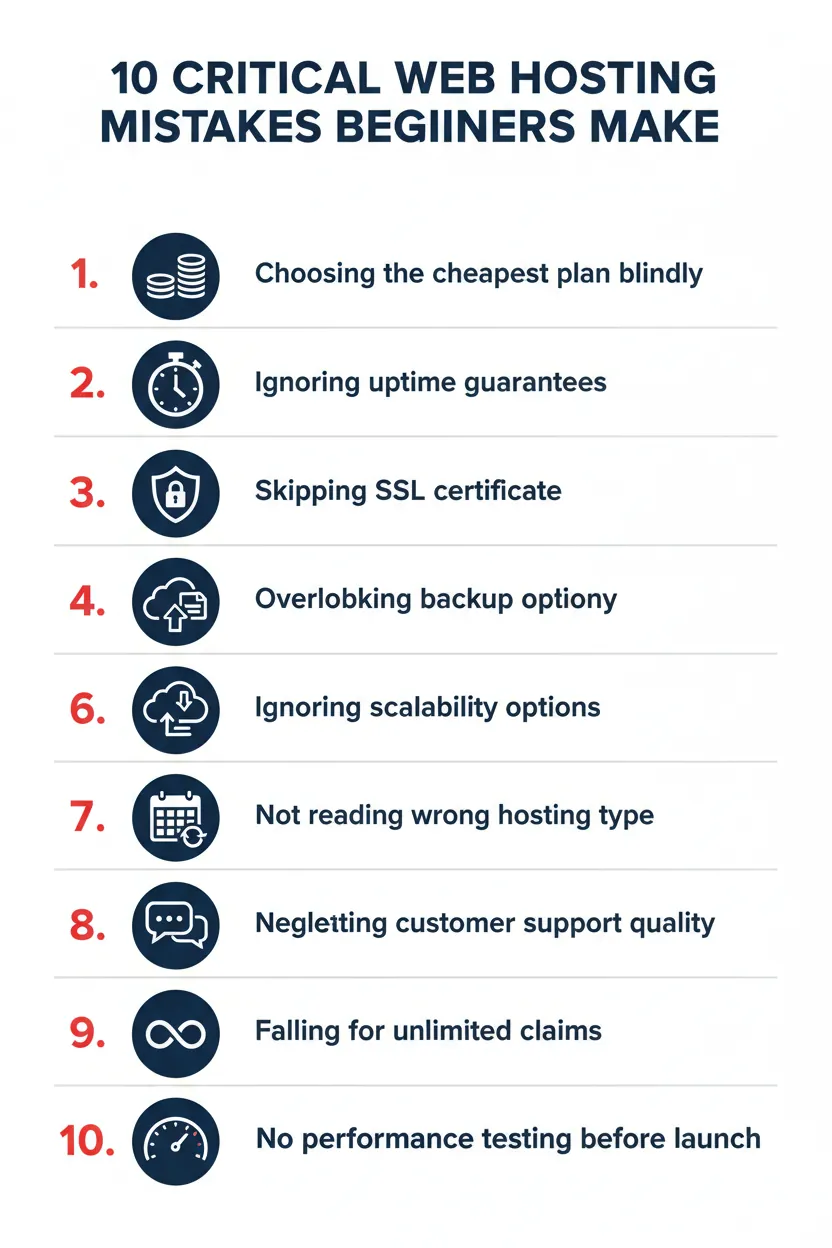
| Mistake | Root Cause | Risk Level | Primary Action |
|---|---|---|---|
| Cheapest Plan Selection | Price-first evaluation | 🔴 High | Assess full-term cost |
| Ignoring Uptime SLA | Perceived irrelevance | 🔴 High | Demand 99.9%+ guarantee |
| Skipping SSL | Assumed auto-inclusion | 🔴 High | Verify pre-purchase |
| No Backup Policy Review | False assumption of coverage | 🔴 High | Confirm daily automation |
| Ignoring Scalability | Short-term mindset | 🟠 Medium | Map growth pathway |
| Unread Renewal Terms | Contract complacency | 🟠 Medium | Review ToS in full |
| Wrong Hosting Type | Insufficient research | 🔴 High | Match plan to use case |
| Weak Support Evaluation | Treated as equal commodity | 🟠 Medium | Test before committing |
| Believing ‘Unlimited’ | Marketing language misread | 🟡 Low | Read Fair Use Policy |
| No Performance Benchmark | Launch urgency pressure | 🟠 Medium | Run pre-launch audit |
13. Frequently Asked Questions (FAQ)
Q1: What is the most common web hosting mistake beginners make?
The most prevalent mistake is selecting a hosting plan based exclusively on introductory price without evaluating renewal rates, resource limits, or the provider’s infrastructure quality. This creates a compounding problem as the website matures and requirements grow.
Q2: Is it possible to recover from a bad hosting decision without losing data?
Recovery is possible but not guaranteed. The successful migration of data from an underperforming provider to a superior one depends on the quality of your existing backups, the complexity of your website’s configuration, and the responsiveness of both providers during the transition window.
Q3: How do I know if my hosting plan is affecting my Google rankings?
Monitor your Core Web Vitals scores through Google Search Console. Declining scores for Largest Contentful Paint (LCP) or First Input Delay (FID) in conjunction with rising server response times are strong indicators that hosting infrastructure is contributing to ranking deterioration.
Q4: Can I switch hosting providers after my website is live?
Yes — and in many cases, switching is the correct course of action when your current provider can no longer meet your performance or reliability requirements. The process involves migrating files, databases, and email configurations, and should be executed with a full backup in place and during a low-traffic window to minimise disruption.
Q5: What should I prioritise when choosing a hosting plan for the first time?
Uptime reliability, SSL inclusion, backup policy, scalability pathway, and support availability should be evaluated before price. A plan that meets these criteria at a slightly higher entry point delivers substantially greater long-term value than a cheaper alternative that compromises on any of them.
14. Conclusion & Call to Action
The difference between a hosting decision that empowers your website and one that constrains it is rarely dramatic — it is a series of small omissions, each individually manageable, but collectively capable of defining the ceiling of your online success. The ten mistakes documented in this guide are not hypothetical. They are the recurring patterns that surface in support tickets, migration requests, and negative reviews submitted by beginners who simply were not equipped with the right framework at the moment of decision.
You now have that framework. Use it not as a checklist to complete once, but as a set of principles to carry into every hosting evaluation — initial selections, annual renewals, and migration decisions alike. A hosting plan chosen with clarity and intention is one of the most durable investments you can make in the long-term performance of your digital presence.