There is one small symbol that separates a trustworthy website from a suspicious one — a tiny padlock icon displayed in the top-left corner of your browser’s address bar. That padlock is powered by SSL, and in 2025, it is no longer optional. It is the minimum baseline of credibility, security, and search engine visibility that every website — from personal blogs to enterprise eCommerce stores — must have to survive online.
Whether you are launching your first website, upgrading an existing one, or evaluating which web hosting provider to trust with your digital presence, understanding SSL is not a technical luxury — it is a business necessity. This comprehensive guide breaks down exactly what SSL is, how it works, why Google rewards SSL-secured websites with higher rankings, and how to get a free SSL certificate included with the best hosting deals available today.
1. What Is SSL? — The Plain-Language Definition
SSL stands for Secure Sockets Layer. It is a globally standardized cryptographic security protocol designed to establish an encrypted, authenticated, and tamper-proof communication channel between a user’s web browser and a web hosting server. In practical terms, SSL ensures that every piece of data exchanged between a visitor and a website — passwords, credit card numbers, personal details, contact form submissions — is scrambled into unreadable ciphertext that only the intended recipient can decode.
Although the industry technically transitioned from SSL to the more advanced TLS (Transport Layer Security) protocol years ago, the term ‘SSL’ remains universally used in marketing, hosting, and everyday conversation. When your hosting provider mentions ‘free SSL,’ they are referring to TLS encryption — the modern, more robust version of the same foundational technology.
An SSL certificate is the digital credential issued by a trusted Certificate Authority (CA) that verifies your website’s identity and activates the encrypted connection. When this certificate is installed on your hosting server, your website’s URL changes from http:// to https:// — the ‘S’ standing for ‘Secure’ — and the padlock icon appears in the browser address bar, signaling to every visitor that your website is legitimate and their data is protected.
2. How Does SSL Encryption Work? — Step by Step
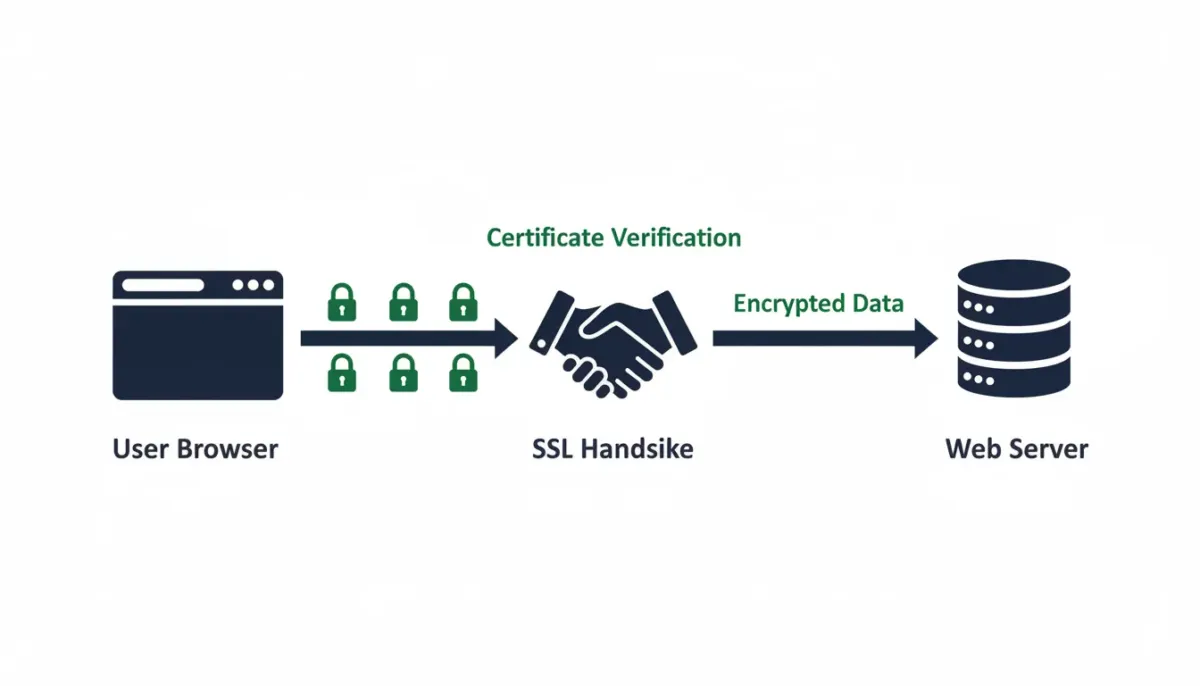
SSL encryption operates through a sophisticated process called the SSL/TLS Handshake — a rapid, automated sequence of cryptographic exchanges that occurs in milliseconds every time a visitor connects to your website. Here is the precise sequence:
- Step 1 — Browser Requests a Secure Connection: The visitor’s browser detects that your website uses HTTPS and sends a ‘Client Hello’ message to your server, listing the encryption algorithms (cipher suites) it supports.
- Step 2 — Server Responds with Its SSL Certificate: Your web hosting server responds with a ‘Server Hello’ message, selects a mutual cipher suite, and sends its SSL certificate — containing your public encryption key and identity verification.
- Step 3 — Browser Verifies the Certificate: The browser checks your SSL certificate against a list of trusted Certificate Authorities. It verifies the certificate is valid, unexpired, and genuinely issued for your domain. If any check fails, the browser displays a security warning to the user.
- Step 4 — Session Keys Are Generated: Both the browser and server use asymmetric encryption (public/private key pairs) to securely exchange a shared symmetric session key — a temporary encryption key unique to this connection.
- Step 5 — Encrypted Communication Begins: All subsequent data exchanged between the browser and server is encrypted using the session key. Even if intercepted, the data appears as indecipherable scrambled characters to any third party.
- Step 6 — Session Ends Securely: When the user leaves your website, the session key is discarded. Each new visit generates a completely fresh set of encryption keys, ensuring persistent security.
3. HTTP vs HTTPS — What Is the Real Difference?
The difference between HTTP and HTTPS is not merely a letter — it is the difference between a website that is exposed and vulnerable versus one that is shielded and verified. Here is a definitive side-by-side comparison:
| 🔓 HTTP (Unsecured) | 🔒 HTTPS (SSL Secured) |
|---|---|
| No encryption — data sent as plain text | AES-256 bit encryption — data is unreadable in transit |
| Vulnerable to man-in-the-middle attacks | Protected against eavesdropping and data interception |
| No identity verification | SSL certificate verifies website authenticity |
| Displays ‘Not Secure’ in Chrome browser | Displays padlock icon — signals trust to visitors |
| Penalized by Google in search rankings | Preferred by Google — confirmed ranking signal since 2014 |
| Causes user abandonment (up to 85% of users leave) | Builds user confidence — increases time on site & conversions |
| Not compliant with PCI DSS standards | Required for eCommerce, payments, and data collection |
| Free — but costs you rankings, trust, and revenue | Free with most reputable hosting plans in 2025 |
The verdict is unambiguous: HTTP is a relic of a less secure internet era. In 2025, every website — regardless of its purpose, size, or traffic volume — must operate exclusively over HTTPS. Anything less is a direct liability to your visitors, your search rankings, and your brand credibility.
4. Why SSL Is a Non-Negotiable Google Ranking Signal
Google officially confirmed HTTPS as a direct ranking signal in 2014, and its SEO weight has only grown more significant in the years since. Here is precisely how your SSL certificate status influences your position in Google search results:
- 🔍 Direct Ranking Factor: Google’s algorithm explicitly favors HTTPS websites over HTTP equivalents, all other factors being equal. In competitive niches — including web hosting, finance, and eCommerce — this advantage can be the deciding margin between Page 1 and Page 2 visibility.
- ⚡ Core Web Vitals & Page Experience: Google’s Page Experience ranking system evaluates HTTPS as one of its core signals alongside Core Web Vitals (LCP, CLS, INP). A site without SSL cannot achieve a passing Page Experience score, regardless of how fast or well-designed it is.
- 🕷️ Googlebot Crawling Preference: Google’s web crawler prioritizes indexing HTTPS pages over HTTP versions. If your website lacks SSL, your pages may be crawled less frequently and ranked with lower authority.
- 📊 Referral Data Integrity: When a visitor travels from an HTTPS website to an HTTP website, all referral source data is stripped and recorded as ‘direct’ traffic in Google Analytics. SSL preserves accurate referral attribution — critical for measuring your marketing performance.
- 🛡️ Chrome Security Warnings: Google Chrome — commanding over 65% of global browser market share — actively displays a ‘Not Secure’ warning in the address bar for all HTTP pages. This warning triggers immediate user abandonment, sending negative engagement signals that harm your SEO rankings.
- 🔗 Link Equity Preservation: Backlinks pointing to HTTPS pages pass full link equity. Links to HTTP pages lose a portion of their SEO value during the redirect chain. SSL maximizes the return on every link you earn.
The strategic conclusion: SSL is not just a security investment — it is a foundational SEO investment. Every hosting provider we recommend on this website includes a free SSL certificate precisely because we understand its irreplaceable role in helping your website rank, attract organic traffic, and convert visitors into customers.
5. How SSL Builds User Trust and Directly Increases Conversions
Beyond its technical and SEO implications, SSL has a profound and measurable psychological impact on user behavior. Multiple independent studies and conversion rate optimization reports confirm the following behavioral patterns:
- 🔒 The Padlock Effect: 85% of online consumers actively look for the padlock icon before entering personal information on a website. Its absence is an immediate trust-breaker that drives visitors directly to a competitor’s SSL-secured website.
- 💳 eCommerce Conversion Impact: Online stores with SSL certificates experience up to 42% higher checkout completion rates compared to non-HTTPS equivalents. Shoppers simply refuse to enter payment details on unsecured pages — and they are absolutely right not to.
- 📉 Bounce Rate Reduction: Chrome’s ‘Not Secure’ warning triggers an average 70% increase in bounce rates on HTTP pages. SSL eliminates this warning entirely, retaining visitors who would otherwise leave immediately.
- ✅ Trust Seal Recognition: Extended Validation (EV) SSL certificates display the company name directly in the browser address bar — a visual trust signal that enterprise brands use to distinguish themselves from fraudulent lookalike websites.
- 📧 Form Submission Confidence: Contact forms, newsletter sign-ups, and lead generation pages on HTTPS websites receive significantly higher submission rates than those on HTTP pages, as users feel confident their information is protected.
6. Types of SSL Certificates Explained
Not all SSL certificates offer identical levels of validation and trust. Understanding the three primary certificate types helps you select the right level of security for your specific website:
| 📋 Type | 🔍 Validation Level | ⏱️ Issuance Time | 🎯 Best For |
|---|---|---|---|
| Domain Validation (DV) | Domain ownership only | Minutes to Hours | Blogs, Personal Sites, Portfolios |
| Organization Validation (OV) | Domain + Business identity | 1–3 Business Days | Business Websites, SMEs |
| Extended Validation (EV) | Full legal entity verification | 1–5 Business Days | eCommerce, Banks, Enterprise |
| Wildcard SSL | DV or OV for all subdomains | Minutes to Days | Sites with Multiple Subdomains |
| Multi-Domain (SAN) | DV or OV for multiple domains | Minutes to Days | Agencies, Multi-Brand Businesses |
💡 For the vast majority of blogs, affiliate websites, and small business sites, a Domain Validation (DV) SSL — which is included free with every top hosting plan we recommend — provides complete, sufficient protection and full SEO benefits. You do not need to purchase an expensive OV or EV certificate unless you are running a financial institution or high-volume eCommerce operation.
7. Do You Need a Paid SSL or Is Free SSL Enough?
This is one of the most frequently asked questions among new website owners, and the answer in 2025 is refreshingly straightforward: for most websites, free SSL is not only sufficient — it is identical in encryption strength to certificates that cost hundreds of dollars per year.
| Free SSL (Let’s Encrypt / AutoSSL) | Paid SSL Certificate ($10–$500+/yr) |
|---|---|
| ✅ 256-bit AES encryption (same as paid) ✅ Full HTTPS activation and padlock ✅ Google ranking signal activated ✅ Included automatically with top hosting plans ✅ Auto-renews every 90 days ❌ No business identity verification ❌ No warranty or liability coverage | ✅ 256-bit AES encryption (same strength) ✅ Organization or Extended Validation available ✅ Company name visible in browser (EV only) ✅ Certificate warranty ($10K–$1.75M) ✅ Priority customer support ✅ Trust seals for display on site ✅ Required for PCI compliance at enterprise level |
Our recommendation: Start with the free SSL certificate included in your hosting plan. Upgrade to a paid OV or EV certificate only when your business handles sensitive financial data, requires PCI DSS compliance, or needs the additional credibility signals that extended validation provides.
8. How to Get SSL — Included Free with the Best Hosting Plans
The single most efficient way to secure your website with SSL in 2025 is to choose a hosting provider that bundles a free SSL certificate with every plan — no separate purchase, no technical configuration, no annual SSL renewal fees to track. Here is the standard process:
- Step 1 — Choose a Hosting Plan with Free SSL Included: Every reputable provider we feature on this website includes a free SSL certificate. When evaluating hosting deals, always confirm that SSL is listed as an included feature — not an add-on that inflates your monthly cost.
- Step 2 — Register Your Domain: SSL certificates are tied to specific domain names. Select your domain during the checkout process — many top hosting plans include a free domain for the first year.
- Step 3 — SSL Is Installed Automatically: With quality hosting providers, your SSL certificate is provisioned and installed automatically within minutes of account activation — no technical expertise required.
- Step 4 — Force HTTPS Across Your Entire Site: Log into your hosting control panel and enable ‘Force HTTPS’ or add a redirect rule in your .htaccess file to ensure all HTTP traffic is permanently redirected to HTTPS.
- Step 5 — Verify Your SSL Is Active: Visit your website and confirm the padlock icon appears in the browser address bar. Use a free tool like SSL Labs (ssllabs.com) to run a full SSL health check and confirm your certificate is correctly configured with an A or A+ rating.
- Step 6 — Set Up Auto-Renewal: Let’s Encrypt SSL certificates expire every 90 days. Confirm your hosting provider handles automatic renewal — all providers we recommend do this seamlessly in the background.
🛒 Ready to get SSL for free? Every hosting provider featured in our exclusive deals section includes SSL at no additional cost. Browse our curated hosting comparisons to find the plan that matches your website’s specific needs and budget.
9. SSL Red Flags: Signs Your Current Hosting Provider Falls Short
Not all hosting providers handle SSL with equal professionalism. Here are the critical warning signs that your current host is cutting corners on your website’s security:
- 🚩 SSL Is a Paid Add-On: Any hosting provider charging extra for SSL in 2025 is behind the industry standard. Free SSL via Let’s Encrypt has been available for nearly a decade — there is no legitimate justification for treating it as a premium feature.
- 🚩 Manual SSL Installation Required: If your host requires you to manually install, configure, or renew SSL certificates without providing automated tools, they are creating unnecessary technical friction for their customers.
- 🚩 No Auto-Renewal System: An expired SSL certificate causes browsers to display alarming security warnings to all your visitors. A quality host automates renewals so your SSL never lapses without warning.
- 🚩 Mixed Content Warnings: If your hosting environment does not support proper HTTPS configuration, you may encounter ‘mixed content’ errors — pages partially loaded over HTTP despite SSL being installed. This nullifies your SSL’s security and SEO benefits.
- 🚩 Shared SSL Certificates: Some budget hosts offer a single SSL certificate shared across multiple customers on the same server. This is technically inferior to a dedicated SSL certificate for your domain and may raise trust concerns with savvy users.
- 🚩 No SSL Support Documentation: A provider that cannot explain their SSL implementation, offer troubleshooting guides, or provide 24/7 support for SSL-related issues is not a partner worth trusting with your website’s security infrastructure.
10. Frequently Asked Questions About SSL
Q: Does SSL slow down my website?
Modern SSL/TLS protocols — particularly TLS 1.3, which all leading hosting providers now support — add negligible latency (typically less than 1 millisecond) to page load times. In fact, HTTPS enables HTTP/2 and HTTP/3 protocols, which dramatically accelerate page loading through multiplexing and other optimizations. A properly configured SSL certificate makes your website faster, not slower.
Q: Will Google rank my HTTPS website higher than a competitor’s HTTP site?
Yes, directly. Google confirmed HTTPS as a ranking signal in 2014 and has continuously emphasized its importance through Core Web Vitals and Page Experience updates. In competitive keyword categories, the HTTPS advantage can be the decisive factor between a Page 1 and Page 2 ranking position.
Q: My website doesn’t collect user data — do I still need SSL?
Absolutely yes. SSL is not exclusively about protecting form submissions or payment data. Google applies its HTTPS ranking preference universally — to every page of every website, regardless of whether it collects user data. Additionally, Chrome displays ‘Not Secure’ on all HTTP pages, destroying user confidence even on purely informational websites.
Q: Can I install SSL on any hosting plan, or do I need a special package?
SSL can be installed on virtually any hosting plan — shared, VPS, cloud, or dedicated. The key distinction is whether your hosting provider includes SSL for free or charges extra for it. Every provider we recommend on this website includes free SSL with all plans. If your current host charges for SSL, it is time to consider switching to a more value-forward provider.
Q: What happens when my SSL certificate expires?
When an SSL certificate expires, browsers immediately display a full-screen security warning to visitors, effectively blocking access to your website. This triggers immediate traffic loss, search ranking drops, and severe damage to user trust. All reputable hosting providers automate SSL renewal to prevent expiration — but always verify this feature is active on your account.
Q: Is an SSL certificate the same as a security certificate?
Yes. ‘SSL certificate,’ ‘TLS certificate,’ ‘HTTPS certificate,’ and ‘security certificate’ all refer to the same digital credential that enables encrypted connections on your website. The terminology varies, but the underlying technology and function are identical.
Secure Your Website Today — Get SSL Free with the Best Hosting Deals
SSL is not a future investment — it is an immediate requirement. Every day your website operates without HTTPS, you are actively losing Google rankings, repelling potential visitors with security warnings, and handing your competitors a measurable advantage. The good news: fixing this costs absolutely nothing when you choose the right hosting provider.
Every hosting deal we feature on this website includes a free SSL certificate, automatic renewal, one-click HTTPS activation, and the performance infrastructure your website needs to rank, convert, and grow in 2025. Browse our exclusive deals — negotiated to deliver savings of up to 80% off standard pricing — and launch your secure, high-performance website today.