Every website you have ever visited — from a simple personal blog to a billion-dollar eCommerce platform — exists because of one fundamental service: web hosting. Yet despite being the absolute backbone of the internet, web hosting remains a misunderstood concept for millions of aspiring website owners, entrepreneurs, and digital creators.
If you have ever wondered what web hosting actually is, how it works behind the scenes, why it matters for your website’s speed and Google ranking, or how to choose the best hosting plan without overspending — this comprehensive guide was written specifically for you.
By the end of this article, you will have a crystal-clear understanding of web hosting, the technology that powers it, and exactly which hosting solution is the right match for your goals in 2025.
1. What Is Web Hosting? — The Simple Definition
Web hosting is a service that provides the technology and infrastructure necessary to store your website’s files — including HTML pages, images, videos, databases, and code — on a powerful computer called a server, and make those files accessible to anyone on the internet, at any time, from anywhere in the world.
Think of it this way: your website is like a physical store. Your domain name is your store’s address — the name people type to find you. Web hosting is the actual building where your store operates. Without the building, the address leads nowhere. Without web hosting, your domain points to nothing.
A web hosting provider is the company that owns and maintains those servers, guarantees their uptime and connectivity, and rents you space on them in exchange for a monthly or annual fee. When someone types your domain into a browser, the internet connects them directly to your hosting server, which delivers your website to their screen in a matter of milliseconds.
2. How Does Web Hosting Work? — Step by Step
Understanding how web hosting works requires a brief journey through the invisible infrastructure of the internet. Here is precisely what happens every single time a visitor lands on your website:
- Step 1 — User Enters Your Domain: A visitor types your website address (e.g., yourwebsite.com) into their browser’s address bar and presses Enter.
- Step 2 — DNS Lookup Begins: The browser contacts a DNS (Domain Name System) server — the internet’s phone book — to translate your human-readable domain name into a numerical IP address (e.g., 192.168.1.1) that identifies the exact server where your website files are stored.
- Step 3 — Request Reaches the Hosting Server: Once the IP address is identified, the browser sends an HTTP/HTTPS request to your web hosting server, essentially asking it to deliver your website’s content.
- Step 4 — Server Processes the Request: Your hosting server receives the request, locates your website files in its storage system, and dynamically compiles the content (especially important for database-driven sites like WordPress).
- Step 5 — Website Is Delivered: The server transmits the files back to the visitor’s browser via the internet. The browser interprets the HTML, CSS, JavaScript, and media files and renders your website visually on screen — typically within 1–3 seconds on a quality hosting plan.
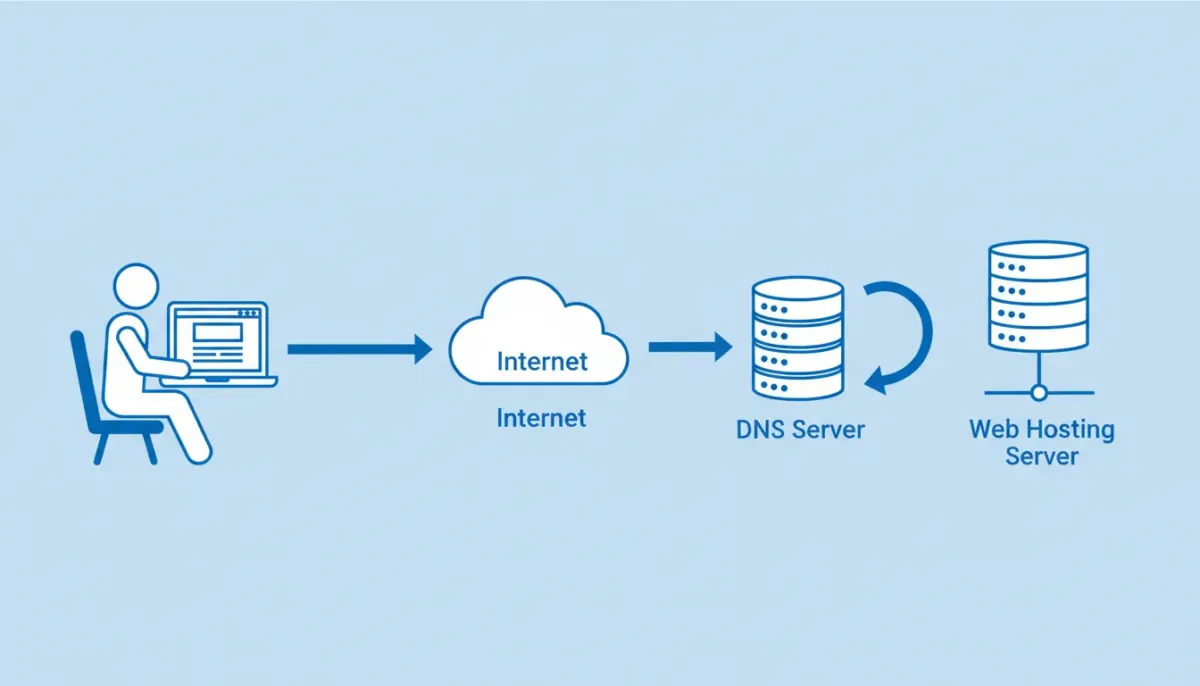
This entire process — from keypress to fully loaded webpage — typically completes in under two seconds on a well-optimized hosting plan. The speed of this process is directly determined by your hosting server’s hardware quality, geographic proximity to the visitor, and the efficiency of the hosting infrastructure.
3. Key Components of a Web Hosting Service
A professional web hosting service is not simply a hard drive plugged into the internet. It is a complex, multi-layered technology stack designed for reliability, speed, and security. Here are the core components that define a quality hosting environment:
- Server Hardware: Physical or virtual machines equipped with high-performance CPUs, fast RAM, and NVMe SSD storage drives. The quality of server hardware directly determines how fast your website loads.
- Operating System: Most hosting servers run Linux distributions (Ubuntu, CentOS, AlmaLinux) for stability and security. Windows hosting is available for .NET and ASP.NET applications.
- Web Server Software: Applications like Apache, Nginx, or LiteSpeed manage incoming requests and deliver website files. LiteSpeed, in particular, is renowned for dramatically accelerating WordPress performance.
- Control Panel: User-friendly dashboards like cPanel, Plesk, or custom panels allow you to manage your files, databases, email accounts, and domains without touching a command line.
- Database Management: MySQL or MariaDB databases store your website’s dynamic content — posts, products, user data, settings — for platforms like WordPress, Magento, and Joomla.
- SSL Certificate: Encrypts data transmitted between your visitors’ browsers and your server (HTTPS). Essential for security, user trust, and Google SEO ranking.
- Bandwidth & Data Transfer: The volume of data your server can transfer to visitors each month. High-traffic websites require generous bandwidth allocations to prevent slowdowns.
- Backup Systems: Automated daily or weekly backups protect your website data against accidental deletion, hacking, or server failures.
- Security Infrastructure: Firewalls, DDoS protection, malware scanning, and intrusion detection systems shield your website from cyberattacks around the clock.
- Uptime Monitoring: Enterprise-grade hosting providers guarantee 99.9% or higher uptime SLAs, ensuring your website remains accessible to visitors at all times.
4. Web Hosting vs. Domain Name — What Is the Difference?
One of the most common points of confusion among beginners is the relationship between a domain name and web hosting. These are two separate services that work together but serve entirely different functions.
| 🌐 Domain Name | 🖥️ Web Hosting |
|---|---|
| Your website’s address (e.g., yoursite.com) | The server where your website files are stored |
| What visitors type in their browser | What delivers the website to the browser |
| Registered through a domain registrar | Purchased from a web hosting provider |
| Points to a server via DNS records | Hosts the actual content of your website |
| Annual renewal fee (~$10–$20/year) | Monthly or annual subscription fee |
💡 Pro Tip: Many leading hosting providers now bundle a free domain name with their hosting plans — saving you the additional registration cost for the first year. Always look for this offer when comparing web hosting deals.
5. Why Web Hosting Quality Directly Impacts Your SEO Rankings
Your choice of web hosting is not merely a technical decision — it is a strategic SEO decision with measurable consequences for your Google search rankings, organic traffic, and ultimately your revenue.
Server Response Time (TTFB)
Google’s algorithm explicitly measures Time to First Byte (TTFB) — the speed at which your server begins responding to a browser request. Servers on overcrowded shared hosting plans routinely deliver TTFBs above 600ms, while premium hosting environments achieve sub-200ms response times. Faster TTFB directly correlates with higher search rankings.
Core Web Vitals
Google’s Core Web Vitals — Largest Contentful Paint (LCP), Cumulative Layout Shift (CLS), and Interaction to Next Paint (INP) — are official ranking signals. All three are influenced by hosting performance. A premium hosting plan with SSD storage, server-side caching, and CDN integration dramatically improves Core Web Vitals scores.
Uptime and Crawlability
When Google’s crawler visits your site and finds it down due to server failures, it may lower your ranking or de-index your pages entirely. Hosting providers with 99.9%+ uptime guarantees ensure your site is always available when Google comes to crawl it.
HTTPS and Security Signals
Google has confirmed HTTPS as a ranking signal since 2014. All reputable hosting providers now include free SSL certificates via Let’s Encrypt or proprietary solutions. An unsecured HTTP site is penalized in rankings and flagged as ‘Not Secure’ in browsers — destroying user trust instantly.
6. What to Look for in a Web Hosting Provider
Not all hosting providers are created equal. Use these seven criteria to evaluate any hosting plan before committing your money and your website:
- ✅ Uptime Guarantee: Look for 99.9% or higher. Even 99.5% uptime means your site could be down 43+ hours per year.
- ✅ Loading Speed & Infrastructure: Check whether the provider uses NVMe SSD storage, LiteSpeed web servers, built-in caching, and CDN integration. These technologies are non-negotiable for competitive loading speeds.
- ✅ Security Features: Free SSL certificate, daily backups, malware scanning, firewall protection, and DDoS mitigation should be standard — not add-on extras.
- ✅ Customer Support Quality: 24/7 support via live chat, phone, and ticketing with knowledgeable staff. Test their response time before purchasing.
- ✅ Scalability Options: Your hosting plan should grow with your website. Ensure seamless upgrade paths from shared to VPS to cloud without disruptive migrations.
- ✅ Pricing Transparency: Watch for dramatically low introductory prices that balloon at renewal. Calculate the true long-term cost before committing.
- ✅ Money-Back Guarantee: Reputable providers offer 30–45 day money-back guarantees, giving you risk-free time to evaluate performance.
7. Types of Web Hosting at a Glance
Web hosting is not a one-size-fits-all service. Different website types and traffic levels demand different hosting environments:
| 🖥️ Hosting Type | 🎯 Best For |
|---|---|
| Shared Hosting | Beginners, Blogs, Small Sites |
| VPS Hosting | Developers, Growing Websites |
| Dedicated Server | Enterprise, High-Traffic Sites |
| Cloud Hosting | Scalable Apps, SaaS, eCommerce |
| Managed WordPress | WordPress Sites, Bloggers |
| Reseller Hosting | Agencies, Freelance Developers |
8. How to Get Started with Web Hosting Today
Getting your website live on the internet is a straightforward process when you follow these steps in order:
- Step 1 — Choose Your Hosting Type: Match your hosting plan to your website’s current needs and anticipated growth. Beginners: start with shared hosting. Developers: consider VPS. WordPress users: opt for managed WordPress hosting.
- Step 2 — Select a Trusted Provider: Compare providers based on uptime guarantees, included features (SSL, domain, backups), pricing transparency, and genuine customer reviews.
- Step 3 — Register Your Domain: Choose a domain name that reflects your brand — short, memorable, and easy to spell. Many hosting providers include a free domain with annual plans.
- Step 4 — Configure Your Hosting Account: Log into your control panel (cPanel or custom dashboard), set up your email accounts, install your CMS (WordPress recommended), and configure your DNS settings.
- Step 5 — Build and Launch Your Website: Use a website builder or WordPress theme to design your site. Add your content, configure plugins for SEO (Yoast or RankMath), optimize your images, and launch!
- Step 6 — Monitor Performance Continuously: Use tools like Google Search Console, GTmetrix, or Pingdom to monitor your site’s speed and uptime regularly. Upgrade your hosting plan as your traffic grows.
9. Frequently Asked Questions About Web Hosting
Q: What is the difference between web hosting and a website builder?
Web hosting provides the server infrastructure to store and serve your website files. A website builder (like Wix or Squarespace) is a visual design tool to create your website’s appearance without coding. Many hosting providers now include integrated website builders with their plans.
Q: Can I change my hosting provider after launching my website?
Yes. Migrating a website from one hosting provider to another is a standard process. Most reputable providers offer free website migration services. It is recommended to test your new hosting environment before cancelling the old plan.
Q: What is uptime in web hosting and why does it matter?
Uptime refers to the percentage of time your hosting server is operational and your website is accessible. 99.9% uptime means your site could experience up to 8.7 hours of downtime per year. High uptime is critical for SEO, user experience, and revenue — every minute of downtime is a lost opportunity.
Q: Do I need technical knowledge to manage web hosting?
Not necessarily. Shared hosting and managed WordPress hosting plans are designed for non-technical users and include intuitive control panels and one-click installers. VPS and dedicated server plans require more technical knowledge unless you choose a fully managed option.
Q: Is free web hosting a good option for a serious website?
Free hosting plans are suitable only for personal experiments and learning. They come with critical limitations: no custom domain, slow servers, intrusive ads, zero customer support, and no uptime guarantees. For any website representing a business or brand, a paid hosting plan is essential.
Ready to Launch Your Website? Find the Best Hosting Deal Today!
Now that you understand exactly what web hosting is, how it works, and what separates a great hosting provider from a mediocre one — the next step is yours to take. Browse our exclusive, curated hosting deals and launch your website with confidence today. Our affiliate partnerships allow us to negotiate special discounts of up to 80% off — savings you won’t find by going directly to the provider’s homepage.